22 November 2017

Download file over HTTPS using Net.WebClient / Scaricare un file via HTTPS con Net.WebClient

Using Net.WebClient over HTTPS returns this error:
The underlying connection was closed: An unexpected error occurred on a send.
Unable to read data from the transport connection: An existing connection was forcibly closed by the remote host.

You have to setup a ServerCertificateValidationCallback event and set the right SecurityProtocol:
Imports System.Net
Imports System.Net.Security
Imports System.Security.Cryptography.X509Certificates

Public Class HTTPS_Test

    Private Function validateCertificate(sender As Object,
                                         certificate As X509Certificate,
                                         chain As X509Chain,
                                         sslPolicyErrors As SslPolicyErrors
                                         ) As Boolean

        '' If the certificate is a valid, signed certificate, return true.
        'If sslPolicyErrors = Security.SslPolicyErrors.None Then
        '    Return True
        'Else
        '    Console.WriteLine("X509Certificate [{0}] Policy Error: '{1}'",
        '                      certificate.Subject,
        '                      sslPolicyErrors.ToString)
        '    Return False
        'End If

        Return True

    End Function


    Public Sub DownloadFromHTTPS()


        '-- IMPOSTAZIONI PER USARE HTTPS/CERTIFICATI - da impostare prima di usare il WebClient
        ServicePointManager.ServerCertificateValidationCallback = AddressOf validateCertificate

        ServicePointManager.SecurityProtocol = SecurityProtocolType.Ssl3 Or
                                                    SecurityProtocolType.Tls Or
                                                    SecurityProtocolType.Tls11 Or
                                                    SecurityProtocolType.Tls12


        Dim url As String = "https://..."

        Using myWebClient As New WebClient()
            Dim data As String = myWebClient.DownloadString(url)
        End Using

    End Sub

End Class


Docs:
  1. Download file over HTTPS using .Net
  2. Set the SecurityProtocol Ssl3 or Tls on the Net.
  3. Best practices for using ServerCertificateValidationCallback

15 November 2017

[Fix] “Input Indicator” icon comes back in taskbar notification area after restarting Windows

Even if you turn off the Input Indicator, it reappears after a reboot.

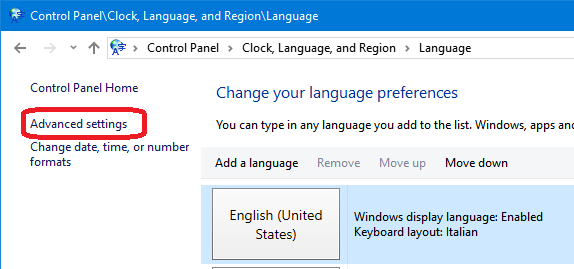
Follow these steps to permanently hide "Input Indicator" icon in Taskbar notification area:

1. Open Control Panel and click Language .

2. Click Advanced settings in the left-side pane


3. Enable Use the desktop language bar when it's available option in "Switching input methods" section.


4. Click Options button and set Language Bar option to Hidden.


Save the changes and it'll permanently remove Input Indicator icon from Taskbar notification area and it'll no longer reappear upon system restart.


Tested on Windows 10.
Via.

10 November 2017

IIS: Could not find a base address "WebHttpBinding / BasicHttpBinding" error

IIS on Windows Server 2012 R2 64bit throws this error:
Could not find a base address that matches scheme http for the endpoint with binding BasicHttpBinding. Registered base address schemes are [https].
Impossibile trovare un indirizzo di base corrispondente allo schema http per l'endpoint con binding WebHttpBinding. Gli schemi degli indirizzi di base registrati sono [].

Find and remove from web.config(?):


.NET Composite Formatting

Alignment Component
The optional alignment component is a signed integer indicating the preferred formatted field width. If the value of alignment is less than the length of the formatted string, alignment is ignored and the length of the formatted string is used as the field width. The formatted data in the field is right-aligned if alignment is positive and left-aligned if alignment is negative. If padding is necessary, white space is used. The comma is required if alignment is specified.
The following example defines two arrays, one containing the names of employees and the other containing the hours they worked over a two-week period. The composite format string left-aligns the names in a 20-character field, and right-aligns their hours in a 5-character field. Note that the "N1" standard format string is also used to format the hours with one fractional digit.

Module Example
   Public Sub Main()
      Dim names() As String = { "Adam", "Bridgette", "Carla", "Daniel",
                                "Ebenezer", "Francine", "George" }
      Dim hours() As Decimal = { 40, 6.667d, 40.39d, 82, 40.333d, 80,
                                 16.75d }

      Console.WriteLine("{0,-20} {1,5}", "Name", "Hours")
      Console.WriteLine()
      For ctr As Integer = 0 To names.Length - 1
         Console.WriteLine("{0,-20} {1,5:N1}", names(ctr), hours(ctr))
      Next
   End Sub
End Module


' The example displays the following output:
'       Name                 Hours
'
'       Adam                  40.0
'       Bridgette              6.7
'       Carla                 40.4
'       Daniel                82.0
'       Ebenezer              40.3
'       Francine              80.0
'       George                16.8

Via.

System.IO.IOException: The process cannot access the file 'file_name'

Quando cancelli o sposti un file:
GC.Collect()
GC.WaitForPendingFinalizers()

Se non basta, provare anche questo (non testato):
public static System.Boolean FileInUse(System.String file)
{
    try
    {
        if (!System.IO.File.Exists(file)) // The path might also be invalid.
        {
            return false;
        }

        using (System.IO.FileStream stream = new System.IO.FileStream(file, System.IO.FileMode.Open))
        {
            return false;
        }
    }
    catch
    {
        return true;
    }
}

Also, to wait for a file I have made:
public static void WaitForFile(System.String file)
{
    // While the file is in use...
    while (FileInUse(file)) ; // Do nothing.
}

Via.

08 November 2017

Il provider 'Microsoft.ACE.OLEDB.12.0' non è registrato nel computer locale. (System.Data)

In SQL Management Studio, facendo una "Importazione/Esportazione guidata":

Impossibile completare l'operazione.

Il provider 'Microsoft.ACE.OLEDB.12.0' non è registrato nel computer locale. (System.Data)

Installare questi driver (32/64 bit in funzione della versione di SQL Management Studio!)

Questa sembra la versione precedente (non testata).


Nuovi URL per donwload:

32-bit: https://web.archive.org/web/20240214170634if_/https://download.microsoft.com/download/2/4/3/24375141-E08D-4803-AB0E-10F2E3A07AAA/AccessDatabaseEngine.exe

64-bit: https://web.archive.org/web/20240214170634if_/https://download.microsoft.com/download/2/4/3/24375141-E08D-4803-AB0E-10F2E3A07AAA/AccessDatabaseEngine_X64.exe