Showing posts with label Windows. Show all posts
Showing posts with label Windows. Show all posts
03 March 2026
CTRL + Break on Dell PC
I can confirm that "ctrl + fn + b" cancels builds in visual studio on my Dell Inspiron 15


21 October 2022
HOWTO configure Windows Firewall for SQL Server
New-NetFirewallRule -DisplayName "SQLServer default instance" -Direction Inbound -LocalPort 1433 -Protocol TCP -Action Allow

New-NetFirewallRule -DisplayName "SQLServer Browser service" -Direction Inbound -LocalPort 1434 -Protocol UDP -Action Allow
NOTE: Remeber to activate the SQLServer Browser service.
13 July 2020
Errore di rete di Windows: "Il nome di rete specificato non è più disponibile"
Se da Windows XP non si riesce ad accedere a Windows 10:
SMBv1, SMBv2 o SMBv3 disabilitati interferiscono con l'accesso alla rete
I protocolli di condivisione della rete come SMBv1 (Server Message Block) consentono di collegare i computer tra loro.
- Pannello di controllo
- Programmi e funzionalità
- Attiva e disattiva funzionalità Windows
- Mettere un segno di spunta sul pulsante di opzione per SMB 1.0 / CIFS File Sharing Support.

SMBv1, SMBv2 o SMBv3 disabilitati interferiscono con l'accesso alla rete
I protocolli di condivisione della rete come SMBv1 (Server Message Block) consentono di collegare i computer tra loro.
- Pannello di controllo
- Programmi e funzionalità
- Attiva e disattiva funzionalità Windows
- Mettere un segno di spunta sul pulsante di opzione per SMB 1.0 / CIFS File Sharing Support.
09 October 2019
Clickpad settings don't save
Everytime you enable/disable something in TrackPad setting Control Panel, it turns back on after restart.
Open RegEdit.exe and go to:
Look for a key in that Install folder called
So, this is a sign something weirder is going on behind the scenes, if the driver thinks it is "upgrading" after every reboot... but anyway, if it works for now, good enough for me
Via.
Open RegEdit.exe and go to:
HKEY_LOCAL_MACHINE\SOFTWARE\Synaptics\SynTP\Install
Look for a key in that Install folder called
DeleteUserSettingsOnUpgrade and change the value to 0 (zero).So, this is a sign something weirder is going on behind the scenes, if the driver thinks it is "upgrading" after every reboot... but anyway, if it works for now, good enough for me
Via.
17 August 2018
How to disable the “Alt+Shift” shortcut to change language in Windows 10 (or Windows 8.1)
The option seems to have moved yet again for the latest Windows 10 update, at least for me (I no longer have a "Language" icon in the Control Panel).
Open the Region & Language settings applet.
Then "Advanced keyboard settings" in Related settings on the right.
Then "Language bar options".
The "Text Services and Input Languages" dialog will appear. Select the "Advanced Key Settings" tab and you'll be shown a Key Sequence list for changing between input languages.
Via.
Open the Region & Language settings applet.
Then "Advanced keyboard settings" in Related settings on the right.
Then "Language bar options".
The "Text Services and Input Languages" dialog will appear. Select the "Advanced Key Settings" tab and you'll be shown a Key Sequence list for changing between input languages.
Via.
12 January 2018
Clear RDP Connections History.bat
Occhio al nome documentI/documentS
@echo off
pause

reg delete "HKEY_CURRENT_USER\Software\Microsoft\Terminal Server Client\Default" /va /f
reg delete "HKEY_CURRENT_USER\Software\Microsoft\Terminal Server Client\Servers" /f
reg add "HKEY_CURRENT_USER\Software\Microsoft\Terminal Server Client\Servers"

cd %userprofile%\documenti\
attrib Default.rdp -s -h
del Default.rdp

pause
15 November 2017
[Fix] “Input Indicator” icon comes back in taskbar notification area after restarting Windows
Even if you turn off the Input Indicator, it reappears after a reboot.
Follow these steps to permanently hide "Input Indicator" icon in Taskbar notification area:
1. Open Control Panel and click Language .
2. Click Advanced settings in the left-side pane
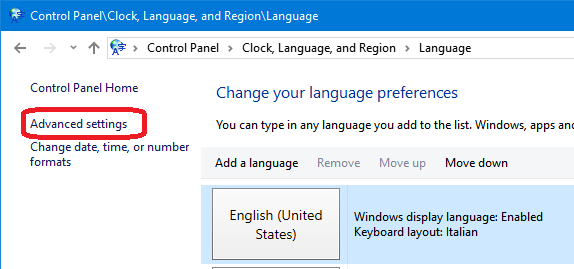
3. Enable Use the desktop language bar when it's available option in "Switching input methods" section.

4. Click Options button and set Language Bar option to Hidden.
Save the changes and it'll permanently remove Input Indicator icon from Taskbar notification area and it'll no longer reappear upon system restart.
Tested on Windows 10.
Via.
Follow these steps to permanently hide "Input Indicator" icon in Taskbar notification area:
1. Open Control Panel and click Language .
2. Click Advanced settings in the left-side pane
3. Enable Use the desktop language bar when it's available option in "Switching input methods" section.
4. Click Options button and set Language Bar option to Hidden.
Save the changes and it'll permanently remove Input Indicator icon from Taskbar notification area and it'll no longer reappear upon system restart.
Tested on Windows 10.
Via.
29 November 2016
Merge/join multiple script files - Unire/concatenare più file di script
Ecco come concatenare più file di testo (in questo caso script SQL):
Se dovessero esserci caratteri "strani", specificare
Diventa:
Versione che rigenera lo script:
Oppure questo metodo (trovato qui):
copy *.sql merged_script.sql
Se dovessero esserci caratteri "strani", specificare
/A    Indicates an ASCII text file
/B    Indicates a binary file
Diventa:
copy /A *.sql merged_script.sql
Versione che rigenera lo script:
del merged_script.sql && copy /A *.sql merged_script.sql
Oppure questo metodo (trovato qui):
type *.sql > OneFile.sql
17 June 2015
LogMeIn Pro and Windows Server 2012 r2
Sintomo:
dopo il login, lo schermo resta nero:
Soluzione:
nella keboard toolbar, cambiare da "legacy logmein mapping" a "use client layout", disconnettersi e riconettersi.
(Provato in SAP)
Via.
dopo il login, lo schermo resta nero:
Soluzione:
nella keboard toolbar, cambiare da "legacy logmein mapping" a "use client layout", disconnettersi e riconettersi.
(Provato in SAP)
Via.
17 April 2015
Windows File Junctions, Symbolic Links and Hard Links
The Windows NTFS file system has supported some form of file and directory pointing since Windows 2000. Unfortunately each revision of Windows until Windows Vista has used a different method of implementing these pointers. So for this article I will just focus on Windows Vista and the identical Windows 7/8 implementations.
In Windows what is the difference between a short-cut, a symbolic link (sym-link) and a hard link?
A short cut is a file that points to another file. It is an antiquated pointing system from the Windows 95 era that many programs do not recognise. Short-cuts do not only use up space on the hard drive, they also break and linger behind after the target has been deleted, renamed or moved.
A symbolic link is like a short-cut but instead of being saved as a file it is registered to the hard drive partition. It does not use any disk space and all programs recognise both the link and the target. A symbolic link can point to any file or folder either locally on the computer or over a network using a SMB path.
A file hard link is a little different and can not be used over multiple partitions meaning you can not have a link on drive C: pointing to a file on drive D:. A file hard link points to and duplicates a target as a mirrored copy but the copy does not use any additional space on the hard drive partition. So 2 hard links that mirrored a 1 GB file would in total only use 1 GB on the partition rather than 3 GB. Importantly if either the hard links or the target are deleted the other links retain the data. Changes to the content of either the target or the links automatically propagate to all other items.
A junction behaves like is a hard link for directories but unlike file hard links you can create junctions that span multiple partitions. Again a directory junction and its content is stored on the hard drive partition but they do not use any additional space. Any changes to the content within either the target or the links will automatically propagate except where the target directory is deleted or renamed. In that case all hard links that point to the target will break and linger on the partition.
Microsoft Windows Vista, 7 and 8 use the command line program mklink to create links. It has 3 arguments and requires both a link name and target.
There are 4 modes for mklink which counteract each other so you can only use at most a single argument.
Supplying no arguments creates file symbolic link which is a pointer to a file.
The word mirrors in this context means the live duplication of the target and the links. Any changes to the structure or the content of any files or any directories will propagate instantly to all links and to the target.
This command would create a directory junction WindowsVista linking (pointing) to the directory C:\Windows.
Via.
In Windows what is the difference between a short-cut, a symbolic link (sym-link) and a hard link?
A short cut is a file that points to another file. It is an antiquated pointing system from the Windows 95 era that many programs do not recognise. Short-cuts do not only use up space on the hard drive, they also break and linger behind after the target has been deleted, renamed or moved.
A symbolic link is like a short-cut but instead of being saved as a file it is registered to the hard drive partition. It does not use any disk space and all programs recognise both the link and the target. A symbolic link can point to any file or folder either locally on the computer or over a network using a SMB path.
A file hard link is a little different and can not be used over multiple partitions meaning you can not have a link on drive C: pointing to a file on drive D:. A file hard link points to and duplicates a target as a mirrored copy but the copy does not use any additional space on the hard drive partition. So 2 hard links that mirrored a 1 GB file would in total only use 1 GB on the partition rather than 3 GB. Importantly if either the hard links or the target are deleted the other links retain the data. Changes to the content of either the target or the links automatically propagate to all other items.
A junction behaves like is a hard link for directories but unlike file hard links you can create junctions that span multiple partitions. Again a directory junction and its content is stored on the hard drive partition but they do not use any additional space. Any changes to the content within either the target or the links will automatically propagate except where the target directory is deleted or renamed. In that case all hard links that point to the target will break and linger on the partition.
Microsoft Windows Vista, 7 and 8 use the command line program mklink to create links. It has 3 arguments and requires both a link name and target.
mklink /D /H /J [LINK NAME] [TARGET]
There are 4 modes for mklink which counteract each other so you can only use at most a single argument.
Supplying no arguments creates file symbolic link which is a pointer to a file.
/D creates a directory symbolic link which is a pointer to a directory.

/H creates a file hard link and is best used in situations where you need multiple mirrors of a file.

/J creates a directory junction which is a directory link that mirrors a the target directory over the same or on a different hard drive partition.
The word mirrors in this context means the live duplication of the target and the links. Any changes to the structure or the content of any files or any directories will propagate instantly to all links and to the target.
mklink /J WindowsVista C:\Windows
This command would create a directory junction WindowsVista linking (pointing) to the directory C:\Windows.
Via.
16 March 2015
"Apri con" un file Markdown con MdWiki
OpenWithMdWiki.bat
Poi impostare il "tasto destro / apri con" e scegliere OpenWithMdWiki.bat
Info trovate:
Qui
Poi qui
Infine qui
@echo off
cls
rem web browser full path
set browserPath="C:\Program Files (x86)\Mozilla Firefox\Firefox.exe"

rem MDWiki path
set mdwikiPath=file:///C:/mdwiki.html#!

rem get Path+Name+Extension of the first batch parameter
set mdFile=%~pnx1

rem needed to replace the "%" characters
setLocal EnableDelayedExpansion

rem replace spaces with %20
set mdFile=!mdFile: =%%20!

rem substring(1,999): removes first character (it's a "\")
set mdFile=%mdFile:~1,999%

rem echo %mdFile%
%browserPath% %mdwikiPath%%mdFile%

set browserPath=
set mdwikiPath=
set mdFile=
EndLocal
Poi impostare il "tasto destro / apri con" e scegliere OpenWithMdWiki.bat
Info trovate:
Qui
Poi qui
Infine qui
07 February 2013
Delete Windows Update Cache.bat
Stoppa il servizio di Windows Update, cancella la directory e fa ripartire il servizio.
Testato su Windows XP.
net stop wuauserv
cd /d %windir%
rd /s SoftwareDistribution
net start wuauserv

pause
Testato su Windows XP.
Subscribe to:
Posts (Atom)