Showing posts with label Windows 10. Show all posts

24 June 2022

Enable / Disable SMB1 on Windows 10 with Powershell

Powershell Method

Here are the steps to detect, disable and enable SMBv1 client and server by using PowerShell commands.

NOTE: The computer will restart after you run the PowerShell commands to disable or enable SMBv1.
# DETECT
Get-WindowsOptionalFeature -Online -FeatureName SMB1Protocol


# DISABLE
Disable-WindowsOptionalFeature -Online -FeatureName SMB1Protocol


# ENABLE
Enable-WindowsOptionalFeature -Online -FeatureName SMB1Protocol
Found here.

13 July 2020

Errore di rete di Windows: "Il nome di rete specificato non è più disponibile"

Se da Windows XP non si riesce ad accedere a Windows 10:


SMBv1, SMBv2 o SMBv3 disabilitati interferiscono con l'accesso alla rete
I protocolli di condivisione della rete come SMBv1 (Server Message Block) consentono di collegare i computer tra loro.

- Pannello di controllo
- Programmi e funzionalità
- Attiva e disattiva funzionalità Windows
- Mettere un segno di spunta sul pulsante di opzione per SMB 1.0 / CIFS File Sharing Support.


09 October 2019

Clickpad settings don't save

Everytime you enable/disable something in TrackPad setting Control Panel, it turns back on after restart.

Open RegEdit.exe and go to:

HKEY_LOCAL_MACHINE\SOFTWARE\Synaptics\SynTP\Install

Look for a key in that Install folder called DeleteUserSettingsOnUpgrade and change the value to 0 (zero).


So, this is a sign something weirder is going on behind the scenes, if the driver thinks it is "upgrading" after every reboot... but anyway, if it works for now, good enough for me


Via.

17 August 2018

How to disable the “Alt+Shift” shortcut to change language in Windows 10 (or Windows 8.1)

The option seems to have moved yet again for the latest Windows 10 update, at least for me (I no longer have a "Language" icon in the Control Panel).

Open the Region & Language settings applet.

Then "Advanced keyboard settings" in Related settings on the right.

Then "Language bar options".

The "Text Services and Input Languages" dialog will appear. Select the "Advanced Key Settings" tab and you'll be shown a Key Sequence list for changing between input languages.


Via.

17 April 2018

Virtual Box Bridged networking not working in Virtualbox under Windows 10

This fix this problem:

Enable "Windows 8" compatibility for VirtualBox executable: right-click on VirtualBox shortcut>Properties: in Properties dialog box: switch to "Compatibility" tab, under "Compatibility mode" section, select the check box next to: "Run this program in compatibility mode", make sure "Windows 8" is selected in combo box. click Ok, run VirtualBox again! (it's not needed to run as Administrator)


Via: https://stackoverflow.com/a/40204718

15 November 2017

[Fix] “Input Indicator” icon comes back in taskbar notification area after restarting Windows

Even if you turn off the Input Indicator, it reappears after a reboot.

Follow these steps to permanently hide "Input Indicator" icon in Taskbar notification area:

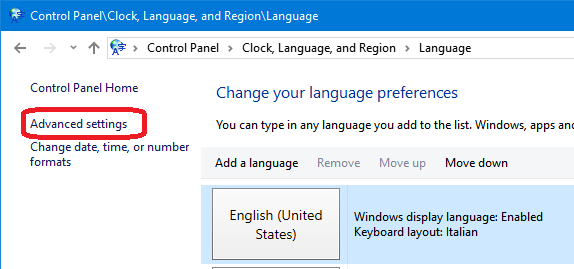
1. Open Control Panel and click Language .

2. Click Advanced settings in the left-side pane


3. Enable Use the desktop language bar when it's available option in "Switching input methods" section.


4. Click Options button and set Language Bar option to Hidden.


Save the changes and it'll permanently remove Input Indicator icon from Taskbar notification area and it'll no longer reappear upon system restart.


Tested on Windows 10.
Via.

05 April 2016

Enable (install) Group Policy Editor GPEdit.msc in Windows 10 Home

Get GPEDIT here for windows 10.

Once downloaded Install as admin.

Go to  C:\Windows\SysWOW64
copy the following:

      Folders: GroupPolicy
                    GroupPolicyUsers
                          and
                     gpedit.msc 

Paste them in the following locations:
C:\Windows\System
C:\Windows\System32

Now hit WINDOWKEY + R
Type: gpedit.msc


Trovato qui.

Anche qui, ma non testato.

08 March 2016

Windows 10, Synaptics touchpad settings lost on logout/reboot

Open up regedit.exe
Navigate to:

HKEY_LOCAL_MACHINE\SOFTWARE\Synaptics\SynTP\Install

Note this is LOCAL MACHINE, not CURRENT USER.

Look for a key in that Install folder called DeleteUserSettingsOnUpgrade

Double click and change the value to 0.

Now go back to the Synaptics control panel, set everything how you like, and reboot.


Trovato qui.

Testato su Windows 10.

09 November 2015

Enabling GodMode for Windows 10

Create a new folder and rename it in:
GodMode.{ED7BA470-8E54-465E-825C-99712043E01C}

Via.

23 October 2015

Download Windows 10 Wallpapers and Lock Screen Backgrounds

Windows 10 Preview Builds:
C:\Users\user_name\appdata\Local\Packages\Microsoft.ContentDeliveryManager_xxxxxxxx\LocalState\Assets\

Windows 10 Final Version:
C:\Users\user_name\appdata\Local\Packages\Microsoft.Windows.ContentDeliveryManager_xxxxxxxx\LocalState\Assets\


You can directly access the folder using %localappdata% environment variable:

Windows 10 Preview Builds:
%localappdata%\Packages\Microsoft.ContentDeliveryManager_xxxxxxxx\LocalState\Assets\

Windows 10 Final Version:
%localappdata%\Packages\Microsoft.Windows.ContentDeliveryManager_xxxxxxxx\LocalState\Assets\


Here xxxxxxxx will be random letters and numbers in folder name.

In this folder, you'll find several files without any extensions. Actually all these are .JPG files which are used to show backgrounds on Lock Screen.

Rename them with .JPG extension and you'll have the hidden background images.


Via.

02 October 2015

Eseguire file batch come amministratore / Execute batch file with elevated user


Launchapp.wsf


Creare un file batch per lanciare altri file:

Launchapp.bat
cscript C:\Users\xxxx\Batch\Launchapp.wsf %1 %2 %3 %4 %5 %6 %7 %8 %9

Installare VirtualBox in Windows 10

Se si ottiene questo errore:
Failed to create extraction path 'C:\Users\xxxx\AppData\Local\Temp\VirtualBox': VERR_ALREADY_EXISTS

eseguire il file scaricato con questi flag:
VirtualBox-4.3.40-101610-Win.exe --path .\tmp --extract

e poi lanciare a mano il setup.


Trovato qui.

24 September 2015

Run Windows 10 Applications as Administrator by Default

Impostare il file "subst.exe" (o anche solo "subst") nel registry! Così, senza percorso.


The workaround to solve the problem cause by another respectfulness from Microsoft towards its customers, is a small registry hack. All you need to do, is to add your application's full path to the following path in Registry under Current User key:

HKCU\Software\Microsoft\Windows NT\CurrentVersion\AppCompatFlags\Layers


Trovato qui.