VBoxManage convertfromraw --format VDI [filename].img [filename].vdiVia.
11 December 2017
VirtualBox - 64 bit option not visible in dorpdown
If you don't see "Linux(64 bit)" as an option in the dropdown, it means that virtualization is not enabled on the host.
Reboot the host, go in to BIOS and enable Virtualization. Exit the BIOS, making sure you save changes.
Reboot the host, go in to BIOS and enable Virtualization. Exit the BIOS, making sure you save changes.


22 November 2017
Download file over HTTPS using Net.WebClient / Scaricare un file via HTTPS con Net.WebClient
Using Net.WebClient over HTTPS returns this error:
You have to setup a ServerCertificateValidationCallback event and set the right SecurityProtocol:
Docs:
The underlying connection was closed: An unexpected error occurred on a send.
Unable to read data from the transport connection: An existing connection was forcibly closed by the remote host.
You have to setup a ServerCertificateValidationCallback event and set the right SecurityProtocol:
Imports System.Net
Imports System.Net.Security
Imports System.Security.Cryptography.X509Certificates

Public Class HTTPS_Test

    Private Function validateCertificate(sender As Object,
                                         certificate As X509Certificate,
                                         chain As X509Chain,
                                         sslPolicyErrors As SslPolicyErrors
                                         ) As Boolean

        '' If the certificate is a valid, signed certificate, return true.
        'If sslPolicyErrors = Security.SslPolicyErrors.None Then
        '    Return True
        'Else
        '    Console.WriteLine("X509Certificate [{0}] Policy Error: '{1}'",
        '                      certificate.Subject,
        '                      sslPolicyErrors.ToString)
        '    Return False
        'End If

        Return True

    End Function


    Public Sub DownloadFromHTTPS()


        '-- IMPOSTAZIONI PER USARE HTTPS/CERTIFICATI - da impostare prima di usare il WebClient
        ServicePointManager.ServerCertificateValidationCallback = AddressOf validateCertificate

        ServicePointManager.SecurityProtocol = SecurityProtocolType.Ssl3 Or
                                                    SecurityProtocolType.Tls Or
                                                    SecurityProtocolType.Tls11 Or
                                                    SecurityProtocolType.Tls12


        Dim url As String = "https://..."

        Using myWebClient As New WebClient()
            Dim data As String = myWebClient.DownloadString(url)
        End Using

    End Sub

End Class
Docs:
15 November 2017
[Fix] “Input Indicator” icon comes back in taskbar notification area after restarting Windows
Even if you turn off the Input Indicator, it reappears after a reboot.
Follow these steps to permanently hide "Input Indicator" icon in Taskbar notification area:
1. Open Control Panel and click Language .
2. Click Advanced settings in the left-side pane
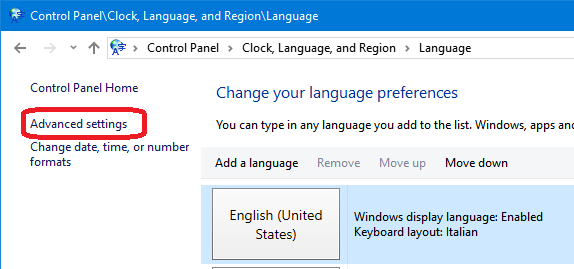
3. Enable Use the desktop language bar when it's available option in "Switching input methods" section.

4. Click Options button and set Language Bar option to Hidden.
Save the changes and it'll permanently remove Input Indicator icon from Taskbar notification area and it'll no longer reappear upon system restart.
Tested on Windows 10.
Via.
Follow these steps to permanently hide "Input Indicator" icon in Taskbar notification area:
1. Open Control Panel and click Language .
2. Click Advanced settings in the left-side pane
3. Enable Use the desktop language bar when it's available option in "Switching input methods" section.
4. Click Options button and set Language Bar option to Hidden.
Save the changes and it'll permanently remove Input Indicator icon from Taskbar notification area and it'll no longer reappear upon system restart.
Tested on Windows 10.
Via.
10 November 2017
IIS: Could not find a base address "WebHttpBinding / BasicHttpBinding" error
IIS on Windows Server 2012 R2 64bit throws this error:
Find and remove from web.config(?):
Could not find a base address that matches scheme http for the endpoint with binding BasicHttpBinding. Registered base address schemes are [https].
Impossibile trovare un indirizzo di base corrispondente allo schema http per l'endpoint con binding WebHttpBinding. Gli schemi degli indirizzi di base registrati sono [].
Find and remove from web.config(?):
.NET Composite Formatting
Alignment Component
The optional alignment component is a signed integer indicating the preferred formatted field width. If the value of alignment is less than the length of the formatted string, alignment is ignored and the length of the formatted string is used as the field width. The formatted data in the field is right-aligned if alignment is positive and left-aligned if alignment is negative. If padding is necessary, white space is used. The comma is required if alignment is specified.
The following example defines two arrays, one containing the names of employees and the other containing the hours they worked over a two-week period. The composite format string left-aligns the names in a 20-character field, and right-aligns their hours in a 5-character field. Note that the "N1" standard format string is also used to format the hours with one fractional digit.
Via.
The optional alignment component is a signed integer indicating the preferred formatted field width. If the value of alignment is less than the length of the formatted string, alignment is ignored and the length of the formatted string is used as the field width. The formatted data in the field is right-aligned if alignment is positive and left-aligned if alignment is negative. If padding is necessary, white space is used. The comma is required if alignment is specified.
The following example defines two arrays, one containing the names of employees and the other containing the hours they worked over a two-week period. The composite format string left-aligns the names in a 20-character field, and right-aligns their hours in a 5-character field. Note that the "N1" standard format string is also used to format the hours with one fractional digit.
Module Example
   Public Sub Main()
      Dim names() As String = { "Adam", "Bridgette", "Carla", "Daniel",
                                "Ebenezer", "Francine", "George" }
      Dim hours() As Decimal = { 40, 6.667d, 40.39d, 82, 40.333d, 80,
                                 16.75d }

      Console.WriteLine("{0,-20} {1,5}", "Name", "Hours")
      Console.WriteLine()
      For ctr As Integer = 0 To names.Length - 1
         Console.WriteLine("{0,-20} {1,5:N1}", names(ctr), hours(ctr))
      Next
   End Sub
End Module


' The example displays the following output:
'       Name                 Hours
'
'       Adam                  40.0
'       Bridgette              6.7
'       Carla                 40.4
'       Daniel                82.0
'       Ebenezer              40.3
'       Francine              80.0
'       George                16.8
Via.
System.IO.IOException: The process cannot access the file 'file_name'
Quando cancelli o sposti un file:
Se non basta, provare anche questo (non testato):
Also, to wait for a file I have made:
Via.
GC.Collect()
GC.WaitForPendingFinalizers()
Se non basta, provare anche questo (non testato):
public static System.Boolean FileInUse(System.String file)
{
    try
    {
        if (!System.IO.File.Exists(file)) // The path might also be invalid.
        {
            return false;
        }

        using (System.IO.FileStream stream = new System.IO.FileStream(file, System.IO.FileMode.Open))
        {
            return false;
        }
    }
    catch
    {
        return true;
    }
}
Also, to wait for a file I have made:
public static void WaitForFile(System.String file)
{
    // While the file is in use...
    while (FileInUse(file)) ; // Do nothing.
}
Via.
08 November 2017
Il provider 'Microsoft.ACE.OLEDB.12.0' non è registrato nel computer locale. (System.Data)
In SQL Management Studio, facendo una "Importazione/Esportazione guidata":
Installare questi driver (32/64 bit in funzione della versione di SQL Management Studio!)
Questa sembra la versione precedente (non testata).
Nuovi URL per donwload:
32-bit: https://web.archive.org/web/20240214170634if_/https://download.microsoft.com/download/2/4/3/24375141-E08D-4803-AB0E-10F2E3A07AAA/AccessDatabaseEngine.exe
64-bit: https://web.archive.org/web/20240214170634if_/https://download.microsoft.com/download/2/4/3/24375141-E08D-4803-AB0E-10F2E3A07AAA/AccessDatabaseEngine_X64.exe
Impossibile completare l'operazione.

Il provider 'Microsoft.ACE.OLEDB.12.0' non è registrato nel computer locale. (System.Data)
Installare questi driver (32/64 bit in funzione della versione di SQL Management Studio!)
Questa sembra la versione precedente (non testata).
Nuovi URL per donwload:
32-bit: https://web.archive.org/web/20240214170634if_/https://download.microsoft.com/download/2/4/3/24375141-E08D-4803-AB0E-10F2E3A07AAA/AccessDatabaseEngine.exe
64-bit: https://web.archive.org/web/20240214170634if_/https://download.microsoft.com/download/2/4/3/24375141-E08D-4803-AB0E-10F2E3A07AAA/AccessDatabaseEngine_X64.exe
30 October 2017
Utilizzare un TimeSpan per cronometrare l'esecuzione del codice
    Sub Cronometra()

        Dim start_time As DateTime = Date.Now

        '-- FACCIAMO FINTA DI FAR QUALCOSA...
        Threading.Thread.Sleep(1000 * 10)

        Dim stop_time As DateTime = Date.Now

        Dim elapsed_time As TimeSpan = stop_time.Subtract(start_time)

        With elapsed_time
            Dim s As String = String.Format("Eseguito in {0:00}:{1:00}:{2:00}",
                                            .TotalHours,
                                            .Minutes,
                                            .Seconds
                                            )

            Console.WriteLine(s)
        End With

    End Sub
11 September 2017
Implementing the .NET IComparer interface to get a natural sort order
Did you notice how Windows Explorer (from WinXP onwards) is intelligent enough to sort the files in a natural order?
If you have some files in your hard disk, they will show in this order:
However, if you try in under DOS or VB, they will appear this way:
This class implements IComparer for natural sort:
Usage example:
Via.
Another implemementation (it sorts Roman numerals also):
If you have some files in your hard disk, they will show in this order:
doc1.txt
doc2.txt
doc10.txt
doc11.txt
However, if you try in under DOS or VB, they will appear this way:
doc1.txt
doc10.txt
doc11.txt
doc2.txt
This class implements IComparer for natural sort:
' https://www.codeproject.com/articles/22517/natural-sort-comparer

Imports System.Collections.Generic
Imports System.Text.RegularExpressions

Public Class NaturalComparer
    Inherits Comparer(Of String)
    Implements IDisposable
    Private table As Dictionary(Of String, String())

    '''
    ''' Ordina le stringhe "naturalmente", cosi' che la stringa "2" compaia prima della stringa "10".
    '''
    Public Sub New()
        table = New Dictionary(Of String, String())()
    End Sub

    Public Sub Dispose() Implements IDisposable.Dispose
        table.Clear()
        table = Nothing
    End Sub

    Public Overrides Function Compare(x As String, y As String) As Integer
        If x = y Then
            Return 0
        End If
        Dim x1 As String(), y1 As String()
        If Not table.TryGetValue(x, x1) Then
            x1 = Regex.Split(x.Replace(" ", ""), "([0-9]+)")
            table.Add(x, x1)
        End If
        If Not table.TryGetValue(y, y1) Then
            y1 = Regex.Split(y.Replace(" ", ""), "([0-9]+)")
            table.Add(y, y1)
        End If

        Dim i As Integer = 0
        While i < x1.Length AndAlso i < y1.Length
            If x1(i) <> y1(i) Then
                Return PartCompare(x1(i), y1(i))
            End If
            i += 1
        End While
        If y1.Length > x1.Length Then
            Return 1
        ElseIf x1.Length > y1.Length Then
            Return -1
        Else
            Return 0
        End If
    End Function

    Private Shared Function PartCompare(left As String, right As String) As Integer
        Dim x As Integer, y As Integer
        If Not Integer.TryParse(left, x) Then
            Return left.CompareTo(right)
        End If

        If Not Integer.TryParse(right, y) Then
            Return left.CompareTo(right)
        End If

        Return x.CompareTo(y)
    End Function

End Class
Usage example:
Using natComp As New NaturalComparer
            Dim files() As String = IO.Directory.GetFiles(searchPath)
            Array.Sort(files, natComp)

            Dim foo As New List(Of String)(IO.Directory.GetFiles(searchPath))
            foo.Sort(natComp)
        End Using
Via.
Another implemementation (it sorts Roman numerals also):
' https://www.codeproject.com/Articles/22978/Implementing-the-NET-IComparer-interface-to-get-a
Imports System.Globalization

Public Class NaturalComparer
    Implements IComparer(Of String)
    Implements IComparer

    Private mParser1 As StringParser
    Private mParser2 As StringParser
    Private mNaturalComparerOptions As NaturalComparerOptions

    Private Enum TokenType
        [Nothing]
        Numerical
        [String]
    End Enum

    Private Class StringParser
        Private mTokenType As TokenType
        Private mStringValue As String
        Private mNumericalValue As Decimal
        Private mIdx As Integer
        Private mSource As String
        Private mLen As Integer
        Private mCurChar As Char
        Private mNaturalComparer As NaturalComparer

        Sub New(ByVal naturalComparer As NaturalComparer)
            mNaturalComparer = naturalComparer
        End Sub

        Public Sub Init(ByVal source As String)
            If source Is Nothing Then source = String.Empty
            mSource = source
            mLen = source.Length
            mIdx = -1
            mNumericalValue = 0
            NextChar()
            NextToken()
        End Sub

        Public ReadOnly Property TokenType() As TokenType
            Get
                Return mTokenType
            End Get
        End Property

        Public ReadOnly Property NumericalValue() As Decimal
            Get
                If mTokenType = NaturalComparer.TokenType.Numerical Then
                    Return mNumericalValue
                Else
                    Throw New NaturalComparerException("Internal Error: NumericalValue called on a non numerical value.")
                End If
            End Get
        End Property

        Public ReadOnly Property StringValue() As String
            Get
                Return mStringValue
            End Get
        End Property

        Public Sub NextToken()
            Do
                'CharUnicodeInfo.GetUnicodeCategory
                If mCurChar = Nothing Then
                    mTokenType = NaturalComparer.TokenType.Nothing
                    mStringValue = Nothing
                    Exit Sub
                ElseIf Char.IsDigit(mCurChar) Then
                    ParseNumericalValue()
                    Exit Sub
                ElseIf Char.IsLetter(mCurChar) Then
                    ParseString()
                    Exit Sub
                Else
                    'ignore this character and loop some more
                    NextChar()
                End If
            Loop
        End Sub

        Private Sub NextChar()
            mIdx += 1
            If mIdx >= mLen Then
                mCurChar = Nothing
            Else
                mCurChar = mSource(mIdx)
            End If
        End Sub

        Private Sub ParseNumericalValue()
            Dim start As Integer = mIdx
            Dim NumberDecimalSeparator As Char = NumberFormatInfo.CurrentInfo.NumberDecimalSeparator(0)
            Dim NumberGroupSeparator As Char = NumberFormatInfo.CurrentInfo.NumberGroupSeparator(0)
            Do
                NextChar()
                If mCurChar = NumberDecimalSeparator Then
                    ' parse digits after the Decimal Separator
                    Do
                        NextChar()
                        If Not Char.IsDigit(mCurChar) AndAlso mCurChar <> NumberGroupSeparator Then Exit Do
                    Loop
                    Exit Do
                Else
                    If Not Char.IsDigit(mCurChar) AndAlso mCurChar <> NumberGroupSeparator Then Exit Do
                End If
            Loop
            mStringValue = mSource.Substring(start, mIdx - start)
            If Decimal.TryParse(mStringValue, mNumericalValue) Then
                mTokenType = NaturalComparer.TokenType.Numerical
            Else
                ' We probably have a too long value
                mTokenType = NaturalComparer.TokenType.String
            End If
        End Sub

        Private Sub ParseString()
            Dim start As Integer = mIdx
            Dim roman As Boolean = (mNaturalComparer.mNaturalComparerOptions And NaturalComparerOptions.RomanNumbers) <> 0
            Dim romanValue As Integer
            Dim lastRoman As Integer = Integer.MaxValue
            Dim cptLastRoman As Integer
            Do
                If roman Then
                    Dim thisRomanValue As Integer = RomanLetterValue(mCurChar)
                    If thisRomanValue > 0 Then
                        Dim handled As Boolean = False

                        If (thisRomanValue = 1 OrElse thisRomanValue = 10 OrElse thisRomanValue = 100) Then
                            NextChar()
                            Dim nextRomanValue As Integer = RomanLetterValue(mCurChar)
                            If nextRomanValue = thisRomanValue * 10 Or nextRomanValue = thisRomanValue * 5 Then
                                handled = True
                                If nextRomanValue <= lastRoman Then
                                    romanValue += nextRomanValue - thisRomanValue
                                    NextChar()
                                    lastRoman = thisRomanValue \ 10
                                    cptLastRoman = 0
                                Else
                                    roman = False
                                End If
                            End If
                        Else
                            NextChar()
                        End If
                        If Not handled Then
                            If thisRomanValue <= lastRoman Then
                                romanValue += thisRomanValue
                                If lastRoman = thisRomanValue Then
                                    cptLastRoman += 1
                                    Select Case thisRomanValue
                                        Case 1, 10, 100
                                            If cptLastRoman > 4 Then roman = False
                                        Case 5, 50, 500
                                            If cptLastRoman > 1 Then roman = False
                                    End Select
                                Else
                                    lastRoman = thisRomanValue
                                    cptLastRoman = 1
                                End If
                            Else
                                roman = False
                            End If
                        End If
                    Else
                        roman = False
                    End If
                Else
                    NextChar()
                End If
                If Not Char.IsLetter(mCurChar) Then Exit Do
            Loop
            mStringValue = mSource.Substring(start, mIdx - start)
            If roman Then
                mNumericalValue = romanValue
                mTokenType = NaturalComparer.TokenType.Numerical
            Else
                mTokenType = NaturalComparer.TokenType.String
            End If
        End Sub

    End Class

    Sub New(ByVal NaturalComparerOptions As NaturalComparerOptions)
        mNaturalComparerOptions = NaturalComparerOptions
        mParser1 = New StringParser(Me)
        mParser2 = New StringParser(Me)
    End Sub

    Sub New()
        MyClass.New(NaturalComparerOptions.Default)
    End Sub

    Public Function Compare(ByVal string1 As String, ByVal string2 As String) As Integer Implements System.Collections.Generic.IComparer(Of String).Compare
        mParser1.Init(string1)
        mParser2.Init(string2)
        Dim result As Integer
        Do
            If mParser1.TokenType = TokenType.Numerical And mParser2.TokenType = TokenType.Numerical Then
                ' both string1 and string2 are numerical
                result = Decimal.Compare(mParser1.NumericalValue, mParser2.NumericalValue)
            Else
                result = String.Compare(mParser1.StringValue, mParser2.StringValue)
            End If
            If result <> 0 Then
                Return result
            Else
                mParser1.NextToken()
                mParser2.NextToken()
            End If
        Loop Until mParser1.TokenType = TokenType.Nothing And mParser2.TokenType = TokenType.Nothing
        Return 0 'identical
    End Function

    Private Shared Function RomanLetterValue(ByVal c As Char) As Integer
        Select Case c
            Case "I"c
                Return 1
            Case "V"c
                Return 5
            Case "X"c
                Return 10
            Case "L"c
                Return 50
            Case "C"c
                Return 100
            Case "D"c
                Return 500
            Case "M"c
                Return 1000
            Case Else
                Return 0
        End Select
    End Function

    Public Function RomanValue(ByVal string1 As String) As Integer
        mParser1.Init(string1)

        If mParser1.TokenType = TokenType.Numerical Then
            Return CInt(mParser1.NumericalValue)
        Else
            Return 0
        End If
    End Function

    Public Function IComparer_Compare(ByVal x As Object, ByVal y As Object) As Integer Implements System.Collections.IComparer.Compare
        Return Compare(DirectCast(x, String), DirectCast(x, String))
    End Function
End Class

 Public Enum NaturalComparerOptions
    None
    RomanNumbers
    'DecimalValues <- we could put this as an option
    'IgnoreSpaces  <- we could put this as an option
    'IgnorePunctuation <- we could put this as an option
    [Default] = None
End Enum

Public Class NaturalComparerException
    Inherits Exception

    Sub New(ByVal msg As String)
        MyBase.New(msg)
    End Sub
End Class
Usage example:
Dim files() As String = IO.Directory.GetFiles(searchPath)
Array.Sort(New NaturalComparer(NaturalComparerOptions.RomanNumbers))

Dim foo As New List(Of String)(IO.Directory.GetFiles(searchPath))
foo.Sort(New NaturalComparer(NaturalComparerOptions.RomanNumbers))
Download source code here. Via.
17 July 2017
Find the Size of Database File – Find the Size of Log File
SELECT
      database_name = DB_NAME(database_id)
    , log_size_mb = CAST(SUM(CASE WHEN type_desc = 'LOG' THEN size END) * 8. / 1024 AS DECIMAL(8,2))
    , row_size_mb = CAST(SUM(CASE WHEN type_desc = 'ROWS' THEN size END) * 8. / 1024 AS DECIMAL(8,2))
    , total_size_mb = CAST(SUM(size) * 8. / 1024 AS DECIMAL(8,2))
FROM sys.master_files WITH(NOWAIT)
--WHERE database_id = DB_ID() -- for current db
GROUP BY database_id
Output:
name           log_size_mb  row_size_mb   total_size_mb
-------------- ------------ ------------- -------------
xxxxxxxxxxx    512.00       302.81        814.81
Trovato qui.
13 June 2017
SQL - Restore database backup over the network
How do you restore a database backup using SQL Server over the network? You have few options to use a network file as a backup source
1) Map network drive/path, hosting file, under SAME user as MS-SQL Server.
2) Use xp_cmdshell extended stored procedure to map network drive from inside of MS SQL
via.
1) Map network drive/path, hosting file, under SAME user as MS-SQL Server.
2) Use xp_cmdshell extended stored procedure to map network drive from inside of MS SQL
-- allow changes to advanced options
EXEC sp_configure 'show advanced options', 1
GO
-- Update currently configured values for advanced options.
RECONFIGURE
GO
-- To enable xp_cmdshell
EXEC sp_configure 'xp_cmdshell', 1
GO
-- Update currently configured values for advanced options.
RECONFIGURE
GO
EXEC xp_cmdshell 'NET USE Z: "\\Srv\Path password1 /USER:Domain\UserName /PERSISTENT:NO "'


--> Afterwards drive Z: will be visible in Server Managment studio, or just

RESTORE DATABASE DataBaseNameHere FROM DISK = 'Z:\BackNameHere.BAK'


-- DISABLE FLAGS

-- To enable xp_cmdshell
EXEC sp_configure 'xp_cmdshell', 0
GO
-- Update currently configured values for advanced options.
RECONFIGURE
GO

-- allow changes to advanced options
EXEC sp_configure 'show advanced options', 0
GO
-- Update currently configured values for advanced options.
RECONFIGURE
GO
via.
12 June 2017
SQL - The conversion of a varchar data type to a datetime data type resulted in an out-of-range value.
Se si incontra questo errore:
Succede quando la lingua del sistema operativo o di SQL Server è diversa da quella utilizzata nell'applicazione; bisogna modificare la lingua dell'utente:
- Security
- Logins
- Proprietà dell'utente:
- Cambiare la lingua: Italiano o British English (stesso formata data/ora, ma messaggi in inglese)
Oppure usare SET DATEFORMAT DMY prima di ogni EXEC...
Msg 242, Level 16, State 3, Procedure MyProcedure_sp, Line 35
The conversion of a varchar data type to a datetime data type resulted in an out-of-range value.
The statement has been terminated.
Succede quando la lingua del sistema operativo o di SQL Server è diversa da quella utilizzata nell'applicazione; bisogna modificare la lingua dell'utente:
- Security
- Logins
- Proprietà dell'utente:
- Cambiare la lingua: Italiano o British English (stesso formata data/ora, ma messaggi in inglese)
Oppure usare SET DATEFORMAT DMY prima di ogni EXEC...
26 May 2017
UNIX/Linux Epoch time in VB.NET
Unix and Unix-like systems, like Linuxes, use Unix Epoch time in system time and time handling libraries. Sometimes you may need to handle these Epoch times in VB.NET or simply convert Epoch times to VB.NET's DateTime type.
Unix Epoch is the number of seconds from midnight January 1, 1970 and value is commonly stored in signed 32-bit integer value. This, however, causes so called year 2038 problem because in January 19, 2038 value reaches 2 147 483 647 and after that "wraps around". But let's not worry about that.
Next function returns non-negative Epoch time in VB.NET's DateTime format.
With negative parameters, the value returned is the same as with Epoch time 0.
The function below converts DateTime type back to Unix's Epoch time.
Since .NET's DateTime can store dates far beyond year 2038, function traps OverFlow exception. When you use this function, you have to check that the returned value is positive integer and consequently valid Epoch value.
My version:
via
via 2
Unix Epoch is the number of seconds from midnight January 1, 1970 and value is commonly stored in signed 32-bit integer value. This, however, causes so called year 2038 problem because in January 19, 2038 value reaches 2 147 483 647 and after that "wraps around". But let's not worry about that.
Next function returns non-negative Epoch time in VB.NET's DateTime format.
'''''' Converts Unix's epoch time to VB DateTime value ''' ''' Epoch time (seconds)'''VB Date '''Public Function EpochToDateTime(ByVal EpochValue As Integer) As Date If EpochValue >= 0 Then Return CDate("1.1.1970 00:00:00").AddSeconds(EpochValue) Else Return CDate("1.1.1970 00:00:00") End If End Function
With negative parameters, the value returned is the same as with Epoch time 0.
The function below converts DateTime type back to Unix's Epoch time.
'''''' Converts VB DateTime value to Unix's epoch time ''' ''' DateTime to convert'''Epoch time (seconds) '''Public Function DateTimeToEpoch(ByVal DateTimeValue As Date) As Integer Try Return CInt(DateTimeValue.Subtract(CDate("1.1.1970 00:00:00")).TotalSeconds) Catch ex As System.OverflowException Return -1 End Try End Function
Since .NET's DateTime can store dates far beyond year 2038, function traps OverFlow exception. When you use this function, you have to check that the returned value is positive integer and consequently valid Epoch value.
My version:
'''''' ''' Converts VB DateTime value to Unix's epoch time ''' ''' DateTime to convert'''Epoch time (seconds) '''Friend Shared Function DateTimeToEpoch(ByVal DateTimeValue As Date) As Integer Try Dim res As Integer Dim dataInizio As DateTime = New DateTime(1970, 1, 1, 0, 0, 0, 0) res = CInt(DateTimeValue.Subtract(dataInizio).TotalSeconds) Return res Catch ex As System.OverflowException Return -1 End Try End Function ''' ''' Converts Unix's epoch time to VB DateTime value ''' ''' Epoch time (seconds)'''VB Date '''Friend Shared Function EpochToDateTime(ByVal EpochValue As Integer) As Date Dim res As Date Dim dataInizio As DateTime = New DateTime(1970, 1, 1, 0, 0, 0, 0) If EpochValue >= 0 Then res = dataInizio.AddSeconds(EpochValue) Else res = dataInizio End If Return res End Function
via
via 2
18 May 2017
Create SQL DB Attach script
Function CreateAttachScript() As String

    Dim template As String = "
PRINT '** {0}'
CREATE DATABASE [{1}] ON
    ( FILENAME = N'C:\Program Files\Microsoft SQL Server\MSSQL12.SQL2014\MSSQL\DATA\{2}' ),
    ( FILENAME = N'C:\Program Files\Microsoft SQL Server\MSSQL12.SQL2014\MSSQL\DATA\{3}' )
 FOR ATTACH
GO
"

    Dim ele As New Dictionary(Of String, String)

    With ele
        .Add("ZZ_Export.mdf", "ZZ_Export_log.ldf")
        .Add("ZZ_Storico.mdf", "ZZ_Storico_log.ldf")
        ' add here other files...
    End With


    Dim s As New System.Text.StringBuilder("USE [master]
GO
")

    Dim dbName As String = ""

    For Each db As KeyValuePair(Of String, String) In ele
        dbName = db.Key.Replace(".mdf", "").Replace(".ldf", "").Replace(".MDF", "").Replace(".LDF", "")

        If dbName <> "" Then
        s.AppendFormat(template, dbName, dbName, db.Key, db.Value)
        End If
    Next

    Return s.ToString

End Function
12 April 2017
Generate a Stream from a String
in C#:
in VB:
Another solution:
Don't forget to use Using:
About the StreamWriter not being disposed. StreamWriter is just a wrapper around the base stream, and doesn't use any resources that need to be disposed. The Dispose method will close the underlying Stream that StreamWriter is writing to. In this case that is the MemoryStream we want to return.
In .NET 4.5 there is now an overload for StreamWriter that keeps the underlying stream open after the writer is disposed of, but this code does the same thing and works with other versions of .NET too.
Trovato qui.
public static MemoryStream GenerateStreamFromString(string value)
{
    return new MemoryStream(Encoding.UTF8.GetBytes(value ?? ""));
}
in VB:
Dim myStream As New MemoryStream(Encoding.UTF8.GetBytes(If(rawData, "")))
Another solution:
public static Stream GenerateStreamFromString(string s)
{
    MemoryStream stream = new MemoryStream();
    StreamWriter writer = new StreamWriter(stream);
    writer.Write(s);
    writer.Flush();
    stream.Position = 0;
    return stream;
}
Don't forget to use Using:
using (Stream s = GenerateStreamFromString("a,b \n c,d"))
{
    // ... Do stuff to stream
}
About the StreamWriter not being disposed. StreamWriter is just a wrapper around the base stream, and doesn't use any resources that need to be disposed. The Dispose method will close the underlying Stream that StreamWriter is writing to. In this case that is the MemoryStream we want to return.
In .NET 4.5 there is now an overload for StreamWriter that keeps the underlying stream open after the writer is disposed of, but this code does the same thing and works with other versions of .NET too.
Trovato qui.
Subscribe to:
Posts (Atom)